
EC2 & Lightsail instances
We handle your EC2 and Lightsail Linux instances day to day: provisioning, kernel and OS patching, and scheduled, notified reboots, with instance resizing, right-sizing, and AMI creation carried out at your request.
On AWS, your Linux servers run on EC2 and Lightsail, behind security groups, Elastic IPs, and EBS volumes. AWS server management from Server Surgeon covers all of it, the way we have run Linux servers since 2005: senior administrators monitor every instance around the clock, respond to every alert and every ticket you open, and keep the OS patched and hardened. If an instance is compromised or a volume fails, we perform disaster recovery and rebuild from a snapshot, an AMI, or off-site backup. Moving servers into AWS? We migrate you with little or no downtime, usually just a few minutes at cutover. One plan, $65 per server per month, on whatever control panel you run.
call +1-877-378-7436 US / +1-213-291-9191 International
Running production Linux on AWS means EC2 instances, EBS volumes, security groups, and the AWS console. That layer is part of our standard Linux Server Management service: senior administrators on a 24/7 queue, the AWS-native pieces handled alongside the operating system and stack, all at the same flat $65 per server per month.
You get everything in our standard Linux server management, plus the AWS-specific work that keeps an EC2 fleet healthy.
We handle your EC2 and Lightsail Linux instances day to day: provisioning, kernel and OS patching, and scheduled, notified reboots, with instance resizing, right-sizing, and AMI creation carried out at your request.
We size and expand EBS volumes, set up scheduled snapshots for point-in-time recovery when you want them, and restore quickly when a volume or instance fails.
We tune security-group and network-ACL rules to your traffic, run the CSF firewall and brute-force protection inside the instance, harden SSH and the kernel, and patch security issues as they appear. Hardening is optional. We recommend it to every customer, and if you have any concerns, we can discuss it first and apply all of it, some of it, or none.
We assign Elastic IPs, manage forward and reverse DNS, and administer Route 53 zones, including the SPF, DKIM, and DMARC records that authenticate mail from your AWS servers.
Where you run Auto Scaling groups or ELB/ALB load balancers, we manage the instances behind them and keep the health checks green. We also tune Apache, NginX, LiteSpeed, PHP-FPM, MySQL, and MariaDB so each instance does more work.
We migrate into AWS from other hosts and clouds, between AWS regions, and out of AWS to other providers or dedicated hardware, with the lowest possible downtime — usually just a few minutes at cutover.
EC2 & Lightsail instance management, OS patching and notified reboots, EBS volume sizing and snapshots, security groups, Elastic IPs, Route 53 DNS, the instances behind your load balancers and Auto Scaling groups, hardening, 24/7 monitoring, disaster recovery, and migrations — all at the flat per-server price.
Account-level AWS work sits outside the flat $65 server management: VPC and subnet design, Elastic Load Balancer and Auto Scaling architecture, IAM users, roles, and policies, RDS and ElastiCache, CloudFront, S3 buckets and lifecycle rules, and CloudWatch dashboards and alarms. Managing that layer as an ongoing, monitored service is exactly why we launched AfterHoursOps — same founder, same senior team, built for full AWS environments on the coverage you choose. Tell the AfterHoursOps AWS Managed Services team what you run. For a one-off scoped task, our sales team can still quote it here.
AWS server management, the way we do it, is Linux server management where the server happens to run on EC2 or Lightsail. We manage the instance and everything on it — the OS, the web and database stack, mail, DNS, and firewall — exactly like any other server, plus the AWS-native pieces that touch it. Patching and scheduled, notified reboots are part of the standing service. When you ask, we also take on the console work, such as an instance-type change run as a scheduled stop and start, or AMI creation. Where an instance no longer matches its real CPU and memory use, we will flag it and right-size the server once you agree.
Around the instance, we handle the parts of AWS your server actually depends on. We size and expand EBS volumes with the filesystem grown live and tune IOPS for a busy database, and when you want point-in-time recovery in place, we schedule EBS snapshots and AMIs to match. We tune security-group and network-ACL rules to your real traffic and add the server-level CSF firewall on top. We manage Elastic IPs and the reverse-DNS records mail servers check, Route 53 zones with SPF, DKIM, and DMARC, and a smart host that gets outbound mail past AWS’s default port-25 throttling. Our Linux Server Backup keeps a copy outside AWS, so your restores never depend on the same account. Through all of it, our monitoring opens the ticket the moment something needs attention, and a senior administrator works it, 24/7.
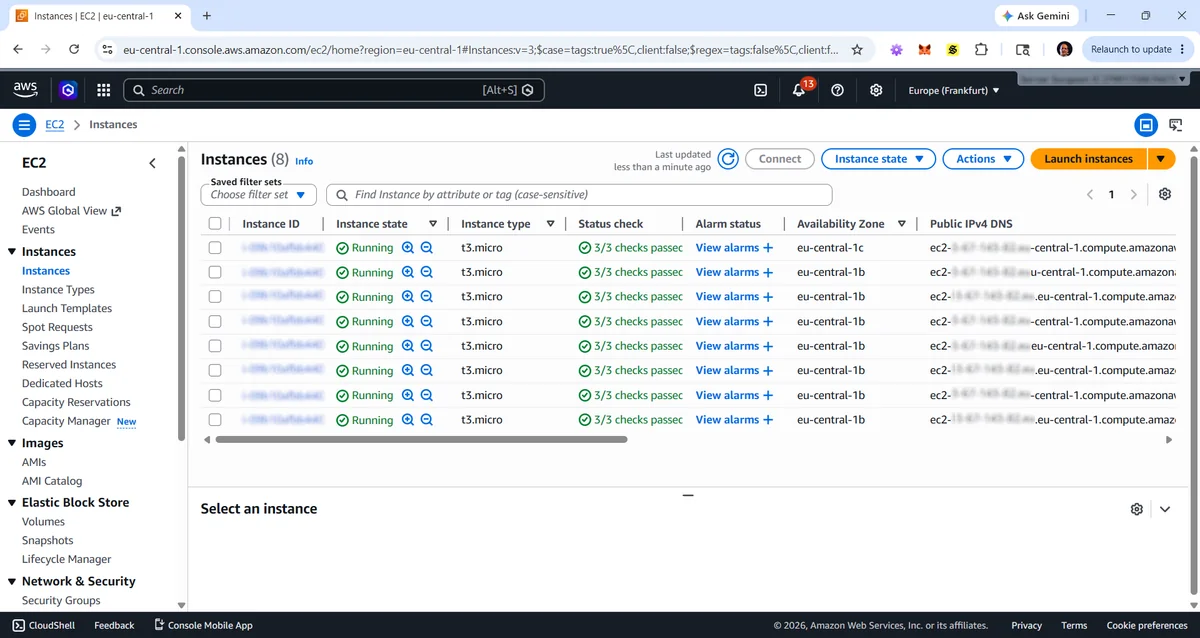
Here is a sample of the EC2 and Lightsail tickets that reach our queue every week, and what resolving each one actually takes.
An EC2 instance failed its status check and is unreachable
We read the system log and console output, fix the kernel, fstab, or network cause behind it, and recover the instance, attaching the volume to a rescue instance where necessary, without rebuilding from scratch.
An EBS volume is full or out of IOPS
We expand the EBS volume and grow the filesystem live, or move the busy data to a higher-IOPS volume, so the database stops stalling, all with no downtime.
A security-group change locked you (or your users) out
We restore the correct security-group rules over a path that still works, recover access, and lock down anything that should never have been open.
Outbound mail from the instance is bouncing or going to spam
AWS throttles port 25 by default. We route outbound mail through a smart host so it can leave the instance, and fix SPF, DKIM, DMARC, and the reverse-DNS (PTR) record so it is properly authenticated.
The instance won’t come back right after a stop/start
We re-associate the Elastic IP, fix the fstab and mount points a stop/start exposed, and bring the services back, then confirm the next stop/start is clean.
You need a bigger (or smaller) instance
We right-size it through a scheduled stop, an instance-type change, and a start, keeping the EBS data and Elastic IP, with the downtime planned and brief.
The instance has been compromised — a cryptominer or strange process
We isolate it with security groups, find and close the entry point, clean it, and rebuild from a known-good AMI or snapshot when that is the safer course.
A volume or instance failed and you need it back
We restore from the latest EBS snapshot or launch a replacement from an AMI, re-attach storage and the Elastic IP, and bring you back online.
AWS server management is not a separate plan; it is where your Linux server happens to run. Most AWS customers also run a control panel, so order from the page that matches yours and we will manage it on AWS all the same:
“Thank you for keeping me updated and for your fabulous support today. I can see that my client's websites are running just fine and email services are back to normal. You (Alexander) and Edward have provided exceptional service, thank you again!”
Paul Server Surgeon Customer
“Everyone was very helpful during this migration. You have a very friendly and knowledgeable staff who made this a cake walk for us. It's not often you work with multiple support reps who know exactly what's going on with a single account. You guys are awesome, and I tell everyone I know about you.”
Jim Server Surgeon Customer
“I have been using your services now for over 5 years and am extremely pleased with the relationship that we have established. Just set it and forget it — you provide a much-needed coverage in our gap between what we know, what we don't, and what we just don't know that we don't know…”
Scott Server Surgeon Customer
$65 per AWS server per month, with volume and prepay discounts that stack. Unlimited tickets. Month-to-month, no fixed-term contract, with a 30-day money-back guarantee. Pick your control panel in the configurator, and your AWS server is in management within an hour or two of us receiving access. Running different panels across your fleet? Order them all on one invoice.
Migrating to a new server? It’s included — order management as you normally would, then describe the move in your onboarding ticket. We manage the old and new server at the cost of one and cut over with a final fast-sync, so there’s no separate migration charge and no interruption for your users — the cutover is scheduled to land with little or no downtime, usually just a few minutes.
These are the questions we hear most often. Search our extensive FAQ here.
No. It is our standard Linux Server Management plan — $65 per server per month. AWS is simply where your Linux server runs. You pick your control panel (or “no panel”) when you order; we manage the server the same way wherever it lives.
Yes. We manage EC2 and Lightsail Linux instances day to day: security groups, Elastic IPs, AMIs, and Route 53 DNS, with EBS volumes, snapshots, and instance sizing handled at your request. Where you run Auto Scaling groups or load balancers, we manage the instances behind them. The wider AWS account architecture — VPC design, CloudFront, IAM, and managed services like RDS — falls outside our standard server management, but we can take some of it on depending on the account, so contact us with what you need. For ongoing management of that whole layer — RDS, load balancers, Auto Scaling, IAM, and the account around them — see AWS Managed Services from AfterHoursOps, our company for full cloud environments, staffed by the same senior administrators.
More questions
Yes. We migrate into AWS from other hosts and clouds, between AWS regions, and out of AWS to DigitalOcean, dedicated hardware, or anywhere else. The final fast-sync runs just before the DNS change, so end users land on the new server without an interruption.
Yes. CentOS 7 stopped receiving security patches when it reached end of life on June 30, 2024, so an instance still on it should move to AlmaLinux or Rocky Linux. We launch a fresh AlmaLinux or Rocky instance from a current AMI, migrate your data and services across, and cut over with a final fast-sync, keeping the Elastic IP so nothing downstream changes, with an EBS snapshot taken first so the original instance is always there to roll back to. There is no separate migration charge — we manage both servers at the cost of one until the move is complete.
Urgent tickets respond in 5 to 10 minutes, standard tickets in 10 to 30, 24/7/365. Our monitoring opens the ticket itself when something on your AWS server needs attention.
We focus on the Linux servers, and where you already run a load balancer or Auto Scaling group, we manage the instances behind it and keep the health checks green. VPC design, CloudFront, IAM, and managed services like RDS sit at the account level, outside our standard server management. We can still take some of that on depending on the account, so contact us and we will tell you what we can do. When you want that whole layer managed and monitored as an ongoing service, that is AfterHoursOps’ AWS Managed Services, operated by the same senior team.
AWS throttles outbound port 25 on new accounts to fight spam. We route your mail through a smart host so it is not stuck behind that throttle, and set SPF, DKIM, DMARC, and the reverse-DNS record so it is properly authenticated.
Yes, when you ask. We change the instance type with a scheduled stop and start, keeping your EBS data and Elastic IP intact, and we plan the brief downtime with you in advance. If you are not sure what size you need, we will look at the real CPU and memory use and recommend one.
We work over SSH with root or sudo, using your existing key pair or one we add for our team. For work in the AWS console we prefer your console login or a scoped IAM user, which we use for tasks such as reboots, instance resizes, snapshots, and Elastic IP changes. We can manage the server itself without that access, but in an emergency we would have to reach you for the console login before we could make those AWS-level changes.
Both. We provision new EC2 or Lightsail instances — base image, OS, the full web and database stack, hardening, and your control panel if you run one — and we take over existing instances by auditing and stabilizing whatever is already there. You do not need to hand us a clean server.
Often, yes. The most common waste is an over-provisioned instance. We will show you where the instance family and size do not match real CPU and memory use, and make the change once you approve.
When AWS itself has an incident we cannot fix Amazon’s infrastructure, but we act on your behalf: confirm what is affected, fail over to a healthy instance or zone where your setup allows it, and rebuild from the latest AMI or snapshot if an instance is lost. Off-site Linux Server Backup means a region-wide problem never leaves you without a copy.
Yes, and often. We take the day-to-day Linux administration and overnight on-call off your team while they keep the AWS account architecture, CI/CD, and application work. We document what we change and stay in our lane — the servers — so there is no question of who owns what.
No minimum and no fixed-term contract. AWS server management is $65 per server per month, month-to-month, with 20% off at five servers or more and a 30-day money-back guarantee. Add or remove servers as your fleet changes.
We have answered many more. Browse our 150+ question FAQ or contact our sales team.
Hand us your AWS servers and let the overnight alerts come to us instead. Month-to-month, no fixed-term contract, with a 30-day money-back guarantee. Most hosting companies stay because the outages stop reaching them.
Or call +1-877-378-7436 US Toll Free / +1-213-291-9191 International
The same team every day, on every server. Three things we promise —
We have handled every common Linux distribution, every panel, and every kind of outage before, and we know how to resolve them.
Every ticket is handled by a senior admin with 8+ years of managing production web hosting servers. No outsourcing, no junior staff logged into your server.
Month-to-month, no fixed-term contract. If we are not the right fit, we refund you without argument. Read the reviews →
Server Surgeon has managed Linux servers on AWS for hosting companies for well over a decade. Many of our customers trust us with their AWS EC2 and Lightsail servers because they know they can rely on our experienced Linux administrators when problems occur.
More about Server Surgeon →